Tech Insights
AWS AgentCore Lets Coding Agents Preview Web Apps Live
Amazon Bedrock AgentCore Session endpoints let developers open an authenticated preview of a web app inside an agent session while the coding agent edits files and hot reloads the browser.
A coding agent can generate a working dashboard or product page in minutes, but the review loop often remains surprisingly old-fashioned: wait for a build, deploy the result somewhere, open a URL, then ask for another change. Every visual correction adds another trip through the deployment pipeline.
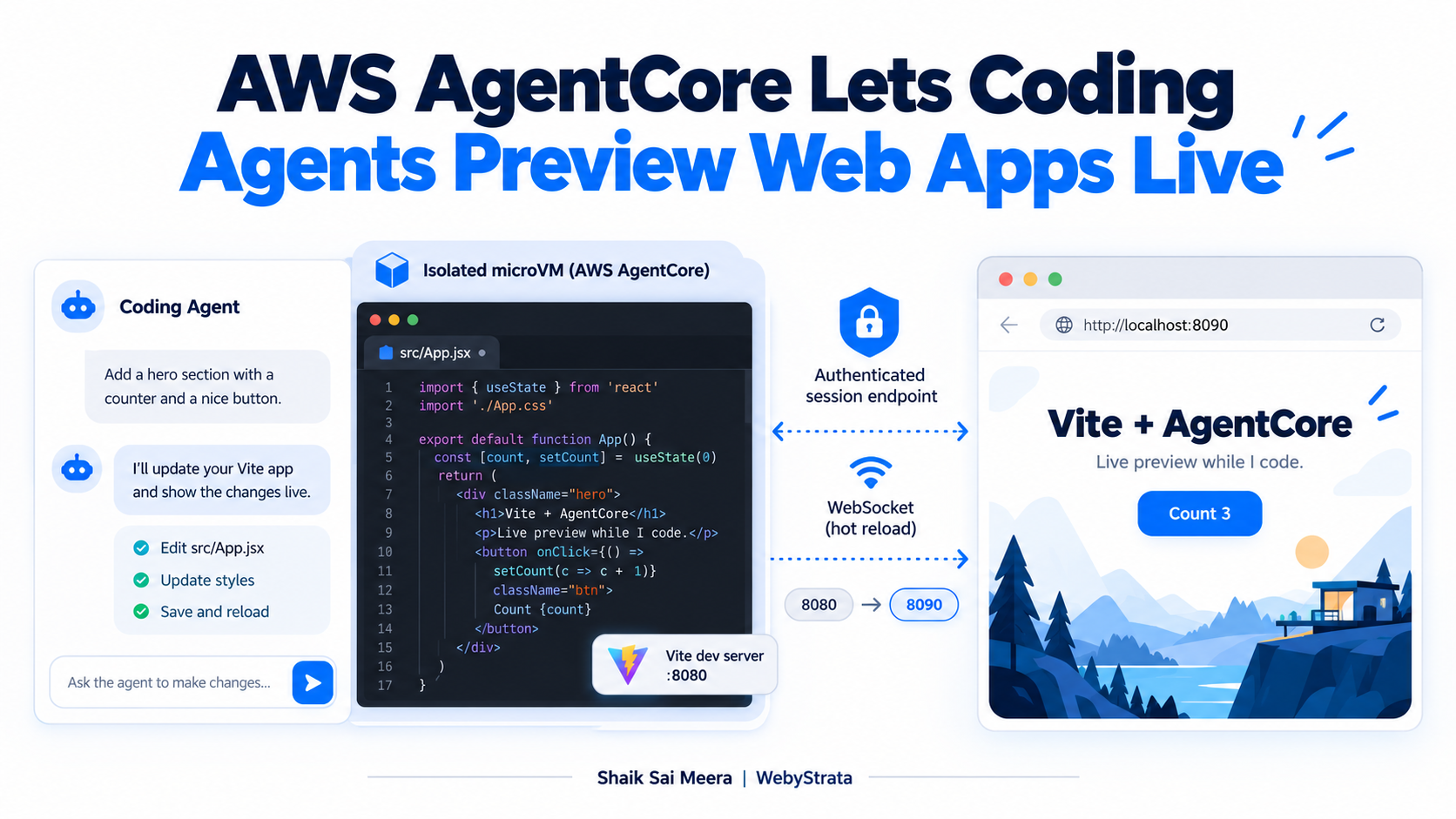
AWS is now showing a different workflow for Amazon Bedrock AgentCore. In its October 30, 2026 walkthrough, the company demonstrates Session endpoints that let developers preview a web app running inside an isolated AgentCore runtime session. The agent edits the files, a Vite development server watches them, and the browser receives the changes through a WebSocket without a manual refresh.
The before-and-after developer loop
Before this pattern, an agent might write a React or Vite application into a temporary workspace. To see the result, a developer would need to copy the files out, start a local server, or deploy them to a preview environment. That handoff separates the agent from the thing it is building. The developer sees the output, but not necessarily the exact runtime state in which the agent made its changes.
With AgentCore Session endpoints, the app stays in the agent’s session. AWS’s sample opens a local preview page with a chat pane and a live website pane. A prompt asks the agent to change the site’s theme; the agent reads and writes the files, Vite detects the change, and the website updates through its hot-reload WebSocket. The practical difference is a much shorter feedback loop: the developer can evaluate the change while the agent is still working in the same isolated environment.
What a Session endpoint exposes
AgentCore runtime runs each agent session in its own isolated microVM. A Session endpoint provides authenticated access to selected application ports inside that session. AWS says a developer can allow one to five ports, each as a single port or range within the supported 8000–12000 range, excluding reserved platform ports.
The endpoint carries more than a simple HTML page. AWS describes support for HTTP/1.1, HTTP/2, server-sent events, gRPC, and WebSocket connections. That makes the feature useful for development servers and interactive previews, not only for static screenshots. In the sample, one port serves the Vite site and another serves a small status route showing the edits made by the agent.
The browser does not receive an unauthenticated public URL. For IAM-based runtimes, requests are signed with AWS Signature Version 4 and require the bedrock-agentcore:InvokeAgentRuntimeProxy permission on the runtime and its endpoint. A JWT-authorized runtime uses a bearer token instead. Knowing the session URL alone is not enough to reach the app.
Why the local endpoint matters
Browsers do not normally add SigV4 signatures to every request made by a page, and they cannot automatically attach a bearer token to a WebSocket handshake. AWS’s sample therefore uses a local endpoint from the AgentCore SDK. The browser talks to a local address, and that local component adds the credentials before forwarding the request to the Session endpoint.
This arrangement keeps the preview experience convenient without turning the session into a public hosting service. It also makes the boundary visible: the application inside the session is reachable only through the allowed ports and the authenticated forwarding path. A request to a port that was not allowed should be rejected, while an allowed port with no server listening will still be unreachable.
A concrete architecture for an agent-built site
The AWS sample separates the agent and the website into two ports. The agent listens on its runtime invocation port and uses tools to list, read, write, and edit files. The Vite server listens on another port and serves the app. The local preview page sends prompts to the agent through InvokeAgentRuntime, while it loads the website through the Session endpoint.
When the agent saves a file, Vite sends a hot-reload message over its WebSocket. The browser receives that message through the local endpoint and authenticated Session endpoint, then updates the page. The developer can watch both the agent’s steps and the visible result in one place.
That separation is useful because it keeps the control channel and the preview channel distinct. It also gives teams a simple way to expose a second diagnostic route, such as a build status or edit history, without mixing it into the public page.
Good use cases—and one important boundary
The obvious use case is visual iteration: landing pages, dashboards, internal tools, demos, and prototypes where a person needs to see whether an agent’s change is useful. The same pattern can help with manual acceptance checks, bug reproduction, UI review, and pair-programming sessions in which a developer steers the agent through several small edits.
It is also a useful foundation for testing interactive behavior. Because WebSockets and streaming protocols can pass through the endpoint, a developer can inspect a running experience rather than only reviewing generated source files. A live preview can reveal issues that are hard to catch in a diff, such as broken layout, missing loading states, or a button that does not behave as the agent described.
The boundary is equally important: AWS says the Session endpoint is scoped to the session and lasts only while the session exists. It is intended for build, test, and review. A site that needs to serve real users still needs a normal deployment target, such as a hosting service. The preview is a development surface, not a replacement for production hosting.
Trade-offs platform teams should consider
Authenticated previewing reduces the need to publish every intermediate build, but it introduces a new access path that needs deliberate permissions. The runtime role should be limited to the resources the agent actually needs, and teams should decide who can invoke the agent and proxy requests into a session.
Session lifetime is another trade-off. The app and its edits live inside the runtime session, so cleanup ends the preview. If a team needs the files to survive the session, it must use a persistent storage design or export the result. The sample’s temporary website is valuable precisely because it is disposable, but that same property makes it unsuitable as the only copy of important work.
Finally, a live browser can make agent changes feel more trustworthy than they are. A page that renders correctly may still contain insecure data handling, weak authorization, or untested edge cases. The preview shortens feedback time; it does not replace code review, tests, dependency checks, or human approval before publication.
What changes for AI-assisted web development
AWS’s example turns a coding agent from a text-only assistant into a participant in a visible build loop. The agent edits the application, the developer sees the result immediately, and the authenticated session provides a controlled bridge between the isolated runtime and the browser.
The larger lesson is that agentic development needs more than code generation. It needs a safe place to run the code, a way to inspect the result, and a clear path from temporary experiment to approved deployment. AgentCore Session endpoints address the middle step: they make the work visible while keeping the preview tied to the session that produced it.
This article is a general information summary based on the cited public sources. It is not legal, cybersecurity, or compliance advice.
Related Articles