Tech Insights
n8n 3.4.0 Preview Tightens AI Workflow Guardrails: What Self-Hosted Teams Should Test Before Upgrading
n8n's 3.4.0 preview is a substantial maintenance release for teams running AI-assisted automation on their own infrastructure. GitHub lists it as a pre-release published on November 24, 2026, at 10:04 UTC—3:34 PM India Standard…
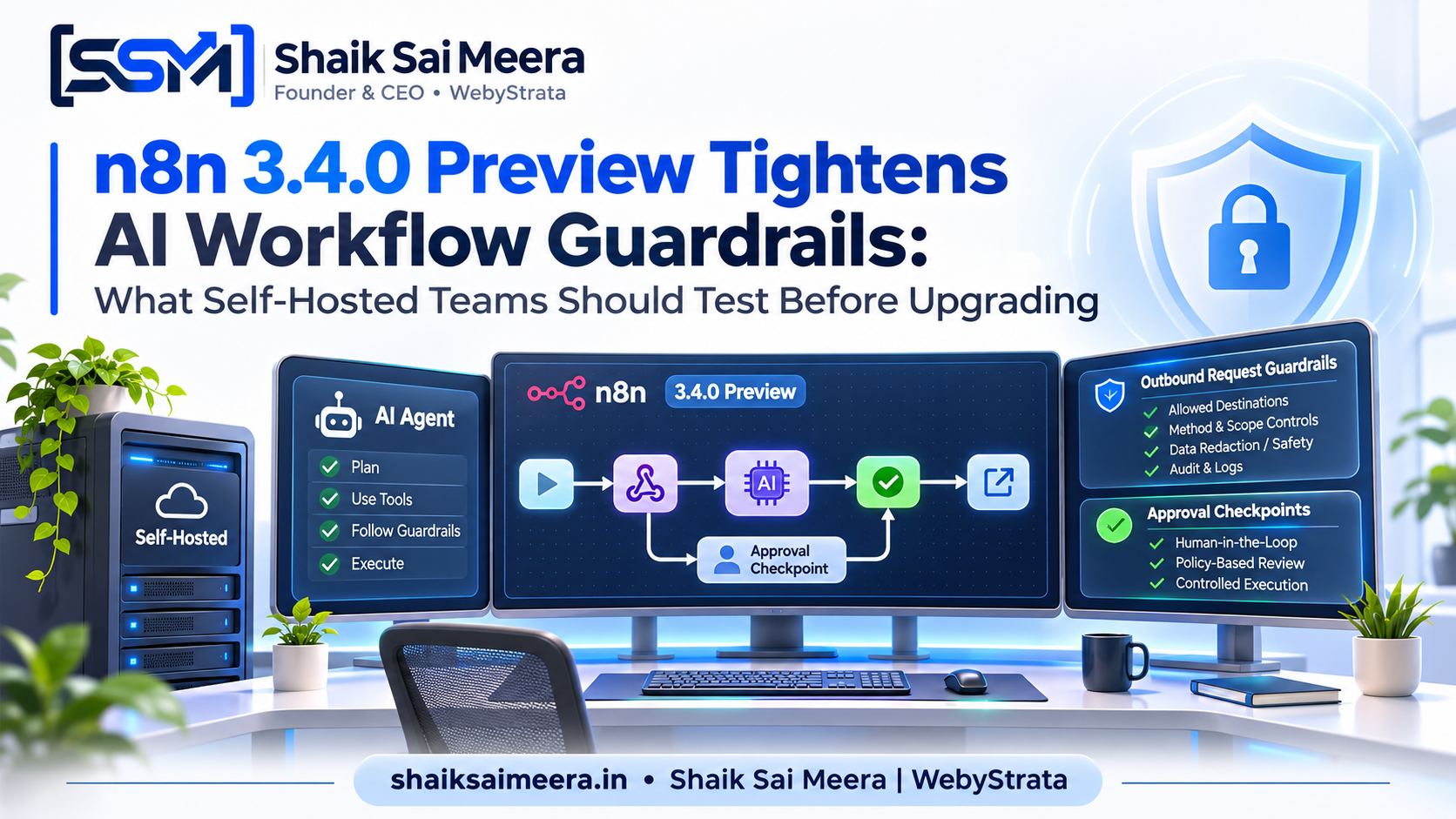
n8n’s 3.4.0 preview is a substantial maintenance release for teams running AI-assisted automation on their own infrastructure. GitHub lists it as a pre-release published on November 24, 2026, at 10:04 UTC—3:34 PM India Standard Time—and its notes span AI Agent behavior, workflow-builder permissions, outbound request controls, session handling, and execution safety. The headline is not a flashy new model. It is a quieter shift toward making agentic workflows more predictable and less permissive by default.
That matters because an n8n workflow is no longer just a chain of deterministic API calls. An AI Agent can choose tools, follow a thread, fetch a URL, write records, send messages, or hand off work to another workflow. Each extra capability increases the value of automation, but also increases the blast radius of a bad prompt, an unsafe destination, a stale credential, or a workflow package imported without enough review.
What changed in the 3.4.0 preview
The official n8n 3.4.0 release notes group the update as bug fixes, but several fixes change the operational safety profile of an instance. The AI Agent Node now drops memory turns with empty content, reducing the chance that malformed conversation state is carried forward. The AI builder also adds clearer handling for open output schemas, resource-locator validation, assistant execution context, and longer single-node runs.
There are important approval and boundary changes too. The release asks for approval when the fetch-url operation is redirected to another domain, expands blocked IP ranges for outbound request protection, and improves the handling of workflow-builder actions such as archive and unpublish. In a self-hosted environment, those controls are more than interface polish: they are checkpoints between an agent’s intent and the network or data it can actually touch.
Under the hood, the preview also improves package import and export checks, execution cancellation, session cleanup, SFTP handshakes, credential testing, binary archive handling, and the behavior of sandboxed expressions. The release notes also call out more precise handling of agent turns, workflow execution usage, WhatsApp recipient limits, and per-recipient replies. Taken together, the pattern is clear: n8n is hardening the edges where automation crosses from a planned workflow into a live system.
A practical example: a support-triage agent
Imagine a self-hosted n8n instance that receives a support email, asks an AI Agent to classify the problem, searches an internal knowledge base, creates a ticket, and posts a summary to a team channel. The workflow is useful precisely because the agent can decide which tool to call next. It is also risky: a malicious attachment or prompt-injected webpage could try to make the agent fetch an unexpected URL, expose ticket data, or send a message to an unintended recipient.
With the preview in a staging instance, the team should test at least four paths. First, provide an email whose text asks the agent to follow a link that redirects from an approved helpdesk domain to an untrusted domain. Confirm that the redirect produces an approval checkpoint and that a reviewer can see the destination before the request continues. Second, give the agent an internal IP or metadata-style address and verify that the outbound request guard blocks it. Third, replay a conversation containing an empty assistant or tool turn and confirm that the agent does not treat the malformed turn as useful memory. Fourth, cancel a long-running execution and verify that only unfinished work stops, without leaving a duplicate ticket or half-applied update.
What to check before upgrading production
Start with a clone of production data and credentials, but keep the clone disconnected from real write destinations. Export representative workflows, including AI Agent flows, sub-workflows, package imports, webhooks, SFTP, WhatsApp, and any flow that uses fetch-url or HTTP Request. Record the current n8n version, Node.js runtime, database engine, queue mode, binary-data storage, and environment variables so a failed test has a known comparison point.
Next, turn the release into a regression matrix. Test the happy path, an approval path, a rejected path, a timeout, a retry, and a cancellation for every high-impact workflow. Pay special attention to workflows that rely on redirects, custom instance roles, project permissions, source-control pulls, external provider examples, and imported packages. A release that improves security can still break an assumption—for example, a workflow that silently depended on a redirect being followed without review.
Finally, inspect the audit trail. The goal is not only to confirm that a request was blocked, but to show who approved it, what destination was presented, which tool was called, and whether the workflow resumed once or more than once. If those events are not visible in your logs or monitoring, add that observability before rollout. Guardrails are difficult to trust when operators cannot reconstruct the decision.
Trade-offs for self-hosted teams
The main advantage of the preview is safer autonomy: agents can remain useful while sensitive actions gain policy or human checkpoints. Better validation and cancellation behavior can also reduce confusing failures in long-running automations. The trade-off is friction. An approval prompt can slow a workflow, redirect checks can require allow-list maintenance, and stricter validation can expose older workflows that were relying on ambiguous inputs.
There is also the normal preview-release risk. n8n marks 3.4.0 as a pre-release, so it should be treated as a test target, not an automatic production recommendation. Teams with regulated workloads may prefer to reproduce the relevant behavior in staging, wait for the stable channel, and use the test results to prepare their change window. Teams that need the fixes sooner should pin the exact version, keep a rollback image, and document which preview-only behavior they are accepting.
The takeaway
n8n 3.4.0 preview is best understood as a guardrail release for agentic automation. The most valuable test is not whether a simple workflow still runs. It is whether the system behaves safely when an agent encounters malformed memory, a redirected URL, an internal address, a long-running action, a package boundary, or an operator cancellation. If your staging evidence shows that those edges are visible, reviewable, and repeatable, you will have a much stronger basis for a later stable upgrade.
This article is a general information summary based on the cited public sources. It is not legal, cybersecurity, or compliance advice.
Related Articles