hosting
Cloudflare’s 30-Day Worker Version Retention Changes How Teams Roll Back
Rollback sounds simple until the version you need is no longer present. A deployment can be healthy when it ships, fail only after a delayed traffic pattern appears, or be replaced by a second…
Rollback sounds simple until the version you need is no longer present. A deployment can be healthy when it ships, fail only after a delayed traffic pattern appears, or be replaced by a second change before anyone has finished investigating it. The practical value of a version history is therefore not just convenience. It is the time a team has to understand a change and return to a known state.
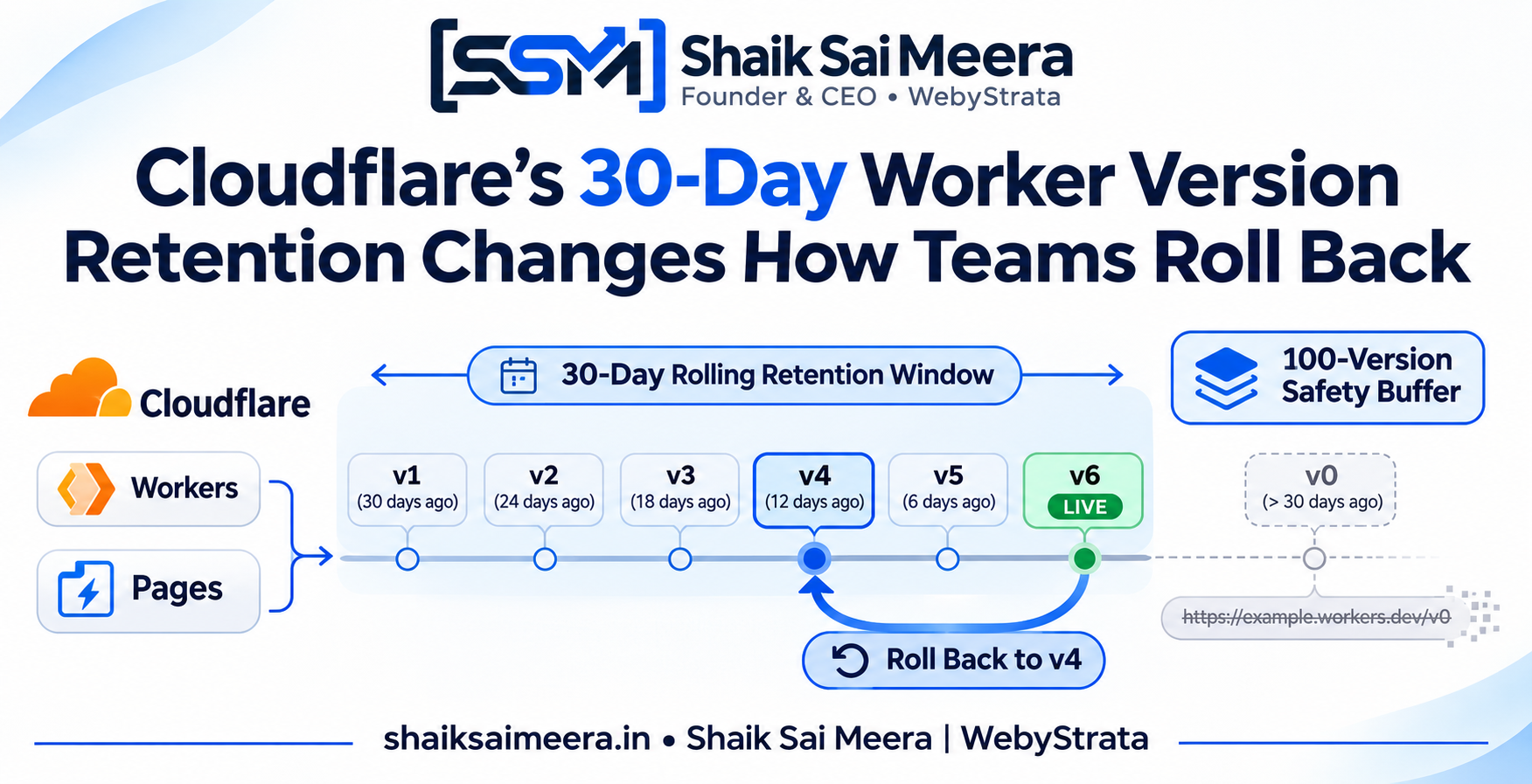
Cloudflare has changed the retention behavior for Workers versions and Pages deployments. In a 19 November 2026 changelog entry, Cloudflare said older versions and deployments are now kept for 30 days, except for the 100 most recent Worker versions and the 100 most recent Pages deployments. The currently deployed Worker version and the current Pages production deployment remain retained.
That creates a clear operational boundary: a version URL is not a permanent archive. Teams that use version URLs for long-lived demos, incident references, or release evidence need to decide what should be copied or preserved outside the platform’s rolling history.
What stays available
Cloudflare’s published change separates running applications from historical records. A deployed Worker version continues to run, and the current Pages production deployment continues to serve the live site. Those active states are not removed simply because they are older than 30 days.
The retention rule applies to older versions and deployments that are no longer part of the active state. Cloudflare says the 100 most recent Worker versions and the 100 most recent Pages deployments remain available as an additional rolling buffer. That means a busy project may reach the age boundary quickly through frequent deployments, while a quieter project may reach the 100-version limit much later.
The source announcement is the Cloudflare Workers and Pages version-retention changelog. This article summarizes that public announcement and does not imply that any particular project is affected.
The important distinction: deployed versions versus previews
Preview behavior is one of the easiest places to make a wrong assumption. Cloudflare says Worker Preview URLs always serve the latest deployment of that preview. They are intended for branches and pull requests, rather than being treated as permanent snapshots of production bindings.
Cloudflare also distinguishes Version URLs. When an older Worker version is deleted, the URL associated with that version—including a preview alias—stops working. For Pages, the preview URL of a deleted deployment also stops working. A link that worked during a review can therefore become a dead link later, even if the main production site is healthy.
The difference matters in a team’s release workflow. A reviewer who needs to compare a branch with production should use the workflow designed for previews. An incident report that needs to identify the exact code should preserve the relevant commit, build artifact, configuration, and deployment metadata rather than relying only on a URL that may fall outside the retention window.
A realistic incident timeline
Imagine a small team deploying a Worker every weekday. A customer reports a subtle routing problem six weeks after a release. The engineer remembers that the behavior began after a change made around that time and searches the dashboard for the old version. If the project has exceeded the 100-version buffer and the version is more than 30 days old, the historical record or Version URL may no longer be available.
The team can still recover if it preserved the release outside the dashboard. The repository commit identifies the code. The CI system retains the build output or can reproduce it. The deployment record captures environment variables and bindings without exposing secrets. An incident timeline records when the version was promoted and which configuration was active.
Without those records, the team may know that a deployment existed but lack the evidence needed to recreate it. The retention change does not create that risk by itself; it makes the risk visible and gives teams a specific time window to address it.
What to change in a deployment workflow
- Keep source control as the authoritative record for application code and configuration templates.
- Attach a commit identifier, build identifier, and deployment timestamp to each release.
- Store reproducible build artifacts for the period your team needs to investigate changes.
- Record bindings and environment configuration separately from secrets.
- Use preview links for review and label them as temporary in tickets and documentation.
- When a release is important, save a release note and a deployment reference before the 30-day window closes.
The purpose is not to keep every version forever. It is to make a deliberate choice about which versions deserve longer-lived evidence. Most routine deployments can follow the rolling history. A migration, pricing change, security-control change, or major content launch may deserve a stronger record.
Trade-offs of a shorter history
Retention limits have benefits. A bounded history makes the dashboard and API easier to reason about, prevents an unexamined archive from growing without limit, and clarifies that deployment history is not the same thing as source control. It also encourages teams to define what they need for rollback instead of assuming every old preview will remain available.
The trade-off is that the platform becomes less suitable as the only place to keep historical evidence. A long-lived QA link, a training document, or a support ticket may reference a URL whose underlying version is eventually deleted. Teams must also think about whether their build system can reproduce a deployment after a dependency, runtime, or configuration changes.
The practical takeaway
Cloudflare’s 30-day rule turns version retention into a release-management decision. The live application remains protected, recent history remains useful, and the 100 most recent versions provide a rolling safety net. But older Version URLs and deleted Pages preview URLs are not permanent assets.
Use the platform history for operational rollback, source control for code, and a separate release record for the changes your team may need to explain months later. When those roles are clear, a retention boundary becomes a predictable workflow rule rather than a surprise during an incident.
This article is a general information summary based on the cited public sources. It is not legal, cybersecurity, or compliance advice.
Related Articles